The B88 App for iOS and Android
The B88 app is faster, more convenient and compatible with iOS and Android devices. Every lobby, your real-time balance and app-exclusive offers are all in one place.
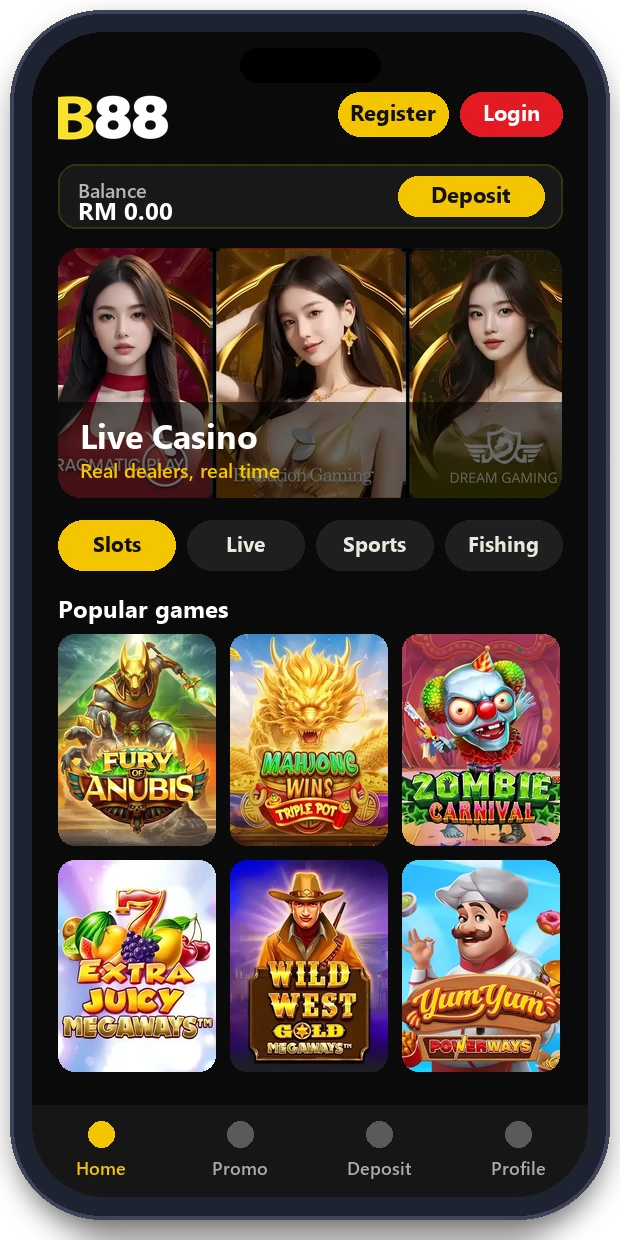
About the B88 App
The B88 app brings Live Casino, Slots, JILI, Fast Games and Sportsbook to your phone with the same account and balance as the website. It works on iOS and Android devices, loads faster and offers exclusive promotions for app users.
To get started, tap Explore the Lobby, follow the download steps for your device, then log in with your existing B88 username and password. Only download the app through official B88 links.
Download the B88 App for More Exclusive Offers. Experience NOW!
- Personalise Your ExperienceGroup your favourite games in one place
- Seamless Wallet TransferTransfer money in seconds
- Gaming Made EasyMore convenient and faster
- Scan to PlayCompatible with iOS and Android devices
- Referral Made EasyShare your referral link and earn rewards
Keep your device up to date and never share your login details with anyone.
B88 APK: How to Install the App on Android
On Android, the B88 app may be installed from an APK file. Only ever use the official download link from B88, never an APK sent in a chat group, posted on a forum or offered by someone you don't know.
- Open the official B88 download link on your Android phone.
- Download the B88 APK. If your phone asks, allow installs from that source for this one install only.
- Open the downloaded file and tap Install.
- Turn the install-from-unknown-sources permission off again in your settings.
- Open the app and log in with your existing B88 username and password.
Installing the B88 App on iPhone and iPad
- Open the official B88 download link on your iPhone or iPad.
- Follow the install steps shown for iOS.
- Open the app and log in with your existing account.
If an install step looks unfamiliar, stop and ask 24/7 live chat to confirm the link before continuing.
How to Spot a Fake B88 APK
Fake app files copy the B88 name and logo to steal logins or install unwanted software.
- The file was sent to you in chat, by email or through a short link.
- The download promises free credit or a guaranteed bonus.
- The app asks for permissions it doesn't need, such as your contacts or SMS.
- The login screen asks for your OTP before you've entered your password.
If you installed an app you're unsure about, delete it, change your B88 password from a trusted device and tell live chat. Our login guide explains how to spot fake login pages too.
Updating the App and Fixing Problems
- Update when the app or official link tells you a new version is available.
- If the app won't open, restart your phone and check you have enough storage.
- If games won't load, switch between Wi-Fi and mobile data.
- Still stuck? You can always play in your phone's browser with the same account.
Trouble with the App?
If the app will not install, will not load or your login fails, our team can walk you through it step by step.
How We Protect Your Account in the App
The app uses the same account protection as the website, so you can play with peace of mind wherever you are.
iOS compatible
Built for iPhone and iPad.
Android compatible
Works on modern Android devices.
Faster
Lobbies and games load quicker than in a browser.
Exclusive offers
Special promotions for B88 app users.
Iovation & ThreatMetrix
Logins from new or unusual devices are monitored.
Encrypted data
App connections are protected by SSL.